
 (+65) 63161284



Traditional locks still have their place, but they become difficult to manage once a building has dozens of employees, several entrances and areas that should only be accessible to certain people.
If a key is lost, for example, there is no way to simply deactivate it. Nor does a mechanical lock tell you who entered a room at 9.30 pm the previous night. A commercial building access control system gives businesses much tighter control over entry, allowing individual credentials to be issued, changed or revoked while maintaining records of access.
That does not mean the most advanced system is automatically the right one. An office with 30 employees may need something very different from a factory with several hundred workers, a loading area and restricted production zones.
Whether you’re choosing between a biometric, key card, or PIN-enabled system, you need to assess your security needs, budget, and capacity for future growth.
1. Start with a Security Needs Assessment
Not every commercial building requires the same level of access control. A high-traffic corporate office, for instance, has different requirements from a warehouse or industrial facility.
Work through these questions before evaluating any system:
- How many entry and exit points does the property have?
- Does the property have restricted internal areas that require additional protection?
- Is round-the-clock monitoring and reporting required?
- Does the setup need to connect with an existing alarm or CCTV camera system?
Your answers determine whether a basic configuration or a more advanced system is the right starting point.
2. Compare the Different Access Methods
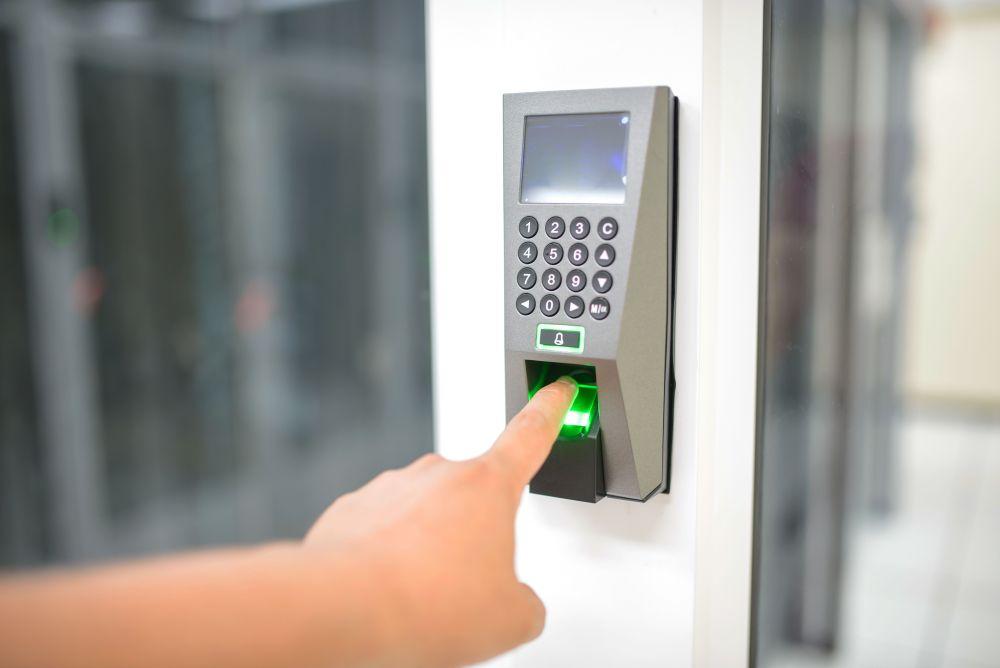
Door access control systems can identify authorised users in several ways, and there is no single option that works best for every building.
- Key Card or Fob Systems: Users are issued assigned cards or fobs, making them well-suited to multi-door commercial installations where access levels vary by role.
- PIN or Password Systems: Entry is granted via a numeric code, allowing rapid deployment across budget-conscious installations. But regular updates are necessary as codes can be shared or compromised.
- Biometric Systems: Fingerprint or facial recognition verifies identity at the point of entry, ensuring strict accountability and a tamper-proof audit trail in high-security zones.
- Mobile Access Systems: Users unlock doors with a smartphone via Bluetooth or NFC, enabling convenient remote access management for modern workplaces.
- Cloud-Based Systems: Access permissions are managed through a secure online portal, allowing administrators to oversee multiple locations from a single interface.
If you’re planning for future infrastructure and workforce growth, a cloud-based or hybrid system offers the most flexibility and scalability.
3. Evaluate Costs Beyond the Initial Purchase
A clear picture of the total cost of ownership can help you avoid underbudgeting for a long-term infrastructure investment. Aside from the upfront equipment costs, your budget planning should account for:
- Installation Costs: Professional wiring adds to upfront expenditure, though wireless setups can reduce this for smaller or lower-risk installations.
- Ongoing Subscription Fees: Cloud-based access control systems typically carry monthly or annual licensing costs that you must factor into long-term budgets.
- Maintenance and Calibration: Biometric systems require periodic calibration and software updates to ensure sustained accuracy and reliability over time.
- Energy Consumption: Multi-door installations draw continuous power, and energy costs compound across larger commercial facilities.
4. Ensure Security System Integration and Scalability
If you’re anticipating headcount growth or facility expansion, you should also plan for scalability. For SMEs and commercial buildings, capabilities to look for are:
- User and Permission Scalability: You should be able to add new users and access tiers without disrupting existing permissions or requiring system-wide reconfiguration.
- CCTV and Surveillance Integration: An integrated security system that connects your commercial access control with CCTV surveillance enables faster incident verification and response.
- Building Management and HR Connectivity: Integration with existing HR or building management software reduces administrative duplication, allowing more efficient access provisioning.
- Remote Administration: Administrators should be able to manage the system off-site, ensuring continuity across multiple sites or during after-hours incidents.
5. Create a Pre-Purchase Checklist
Before committing to a commercial access control system, work through the following:
- Restricted Zone Mapping: Identify which areas of the facility require controlled access before specifying any equipment.
- IT and HR Infrastructure Compatibility: Confirm the chosen system integrates with existing platforms to avoid duplicating records or access-management tasks.
- Personal Data Protection Act (PDPA) Compliance: If you’re going to collect biometric data, ensure your policies and systems align with Singapore’s PDPA.
- Remote Monitoring Requirements: Confirm the system’s remote monitoring capability meets operational needs for after-hours and multi-site management.
- Expansion Readiness: Verify the system will accommodate planned headcount or facility growth without a full hardware replacement.
6. Choose the Right Installation and Support Partner
The reliability of your commercial access control system will depend on the installer’s expertise. Look for a partner that offers:
- Custom System Design: Solutions should be designed around your facility’s specific layout and security requirements, not applied as a standardised package.
- Defined Service Agreements: Clear maintenance and update terms prevent coverage gaps and provide predictable long-term costs.
- On-Site Staff Training: Administrator and staff training at handover ensures the system is used correctly from installation day.
- Local Technical Support: A local support team reduces downtime when issues arise, allowing for faster system expansion as operational needs evolve.
In Singapore, working with a provider holding a Singapore Police Force (SPF) licence and Building and Construction Authority (BCA) ME04 (Communication & Security Systems) registration gives businesses confidence that installation standards meet local regulatory requirements.
Get Your Commercial Access Control Right from the Start
Choosing the right access control system for a commercial building involves a proper evaluation of your security requirements, budget, and scalability needs. This approach helps you select the ideal system while staying adaptable as your organisation grows.
Huntaway Security is an SPF-licensed security provider (Licence: L/PS/001716/2012P) offering tailored commercial security access control design and professional installation.
Contact us today for a consultation to find out which access control system best suits your facility’s requirements.